
How to Track Advertising Expenses by Platform in QuickBooks Online
Most business owners can tell me roughly what they spend on advertising. What they can't tell me is where it went, or whether it did anything. I hear "we spend a lot on ads" more than almost anything else. A lot compared to what? Compared to what it's bringing in? That's not a judgment. It's a bookkeeping problem, and it's a fixable one.
Here's what a typical P&L looks like when ad spend hasn't been set up properly: one line. "Advertising." A number. Maybe a big one. That's it. Helpful for your tax preparer when they're submitting clean figures to the CRA. Completely useless if you're trying to figure out whether your Meta budget is pulling its weight or quietly draining your account every month.
Ad platforms are not going to volunteer that information. Google, Meta, Pinterest, TikTok, they all have dashboards full of metrics designed to make your spend look productive. Impressions. Reach. Clicks. What they don't tell you is whether any of that turned into revenue. And if your books aren't set up to tell you either, you're flying blind in both directions.
How to set up advertising sub-accounts in QBO
Your P&L needs to show you more than a bulk number before ROI is even a conversation. Not as one bulk number. Broken down by platform, by campaign type, however your business runs ads.
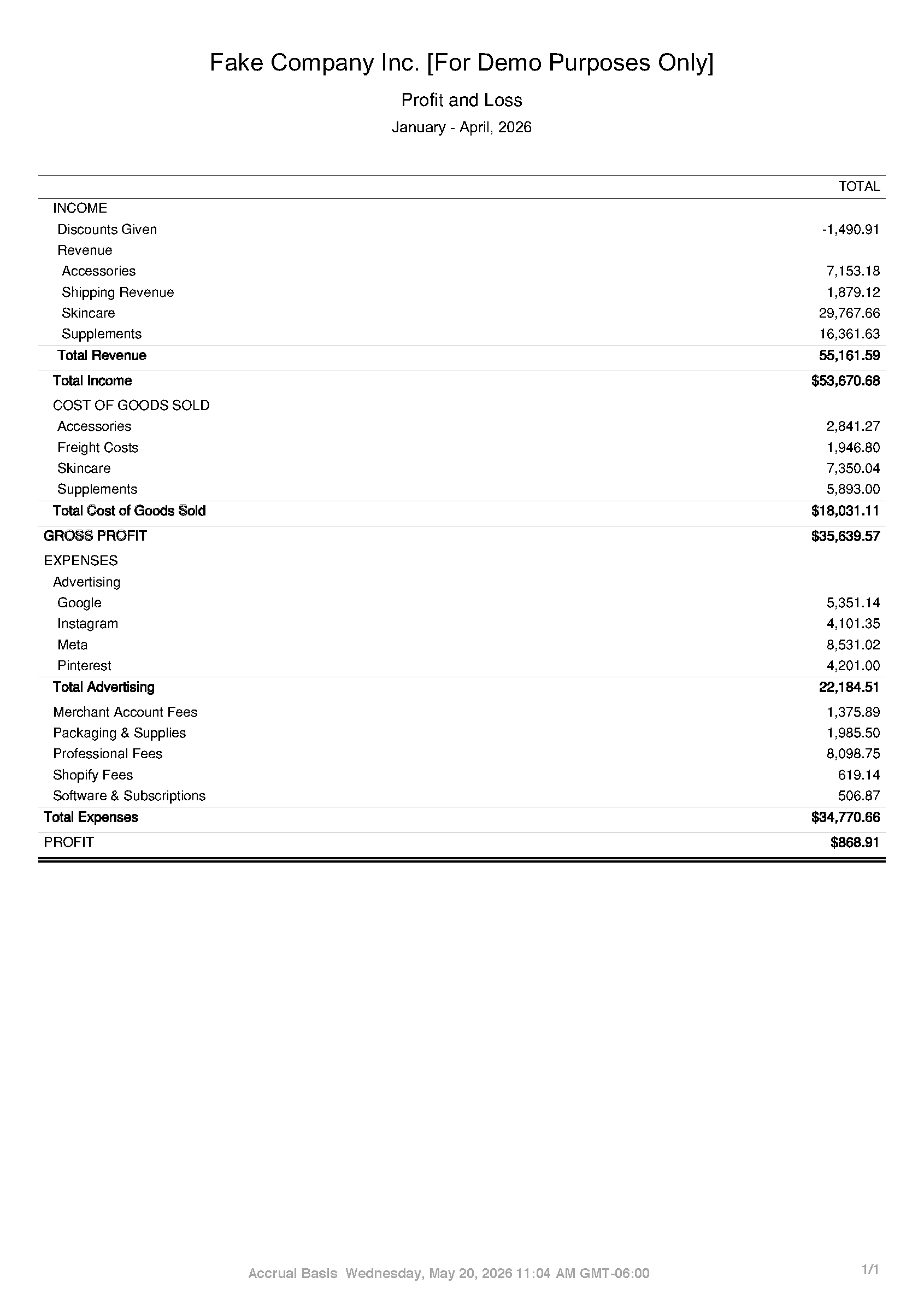
In QBO, this means setting up your advertising expenses as sub-accounts, one per platform. Think of sub-accounts like a folder with files inside. Your tax preparer gets the clean total on the outside — tidy figures, nothing to trip over at filing time. You and I crack it open and see exactly where the money went. Same books. Two different conversations, depending on who's in the room. Every transaction gets coded to the right platform when it comes in, and from there you can pull a custom report that filters your P&L to show only your advertising activity, by month, side by side.
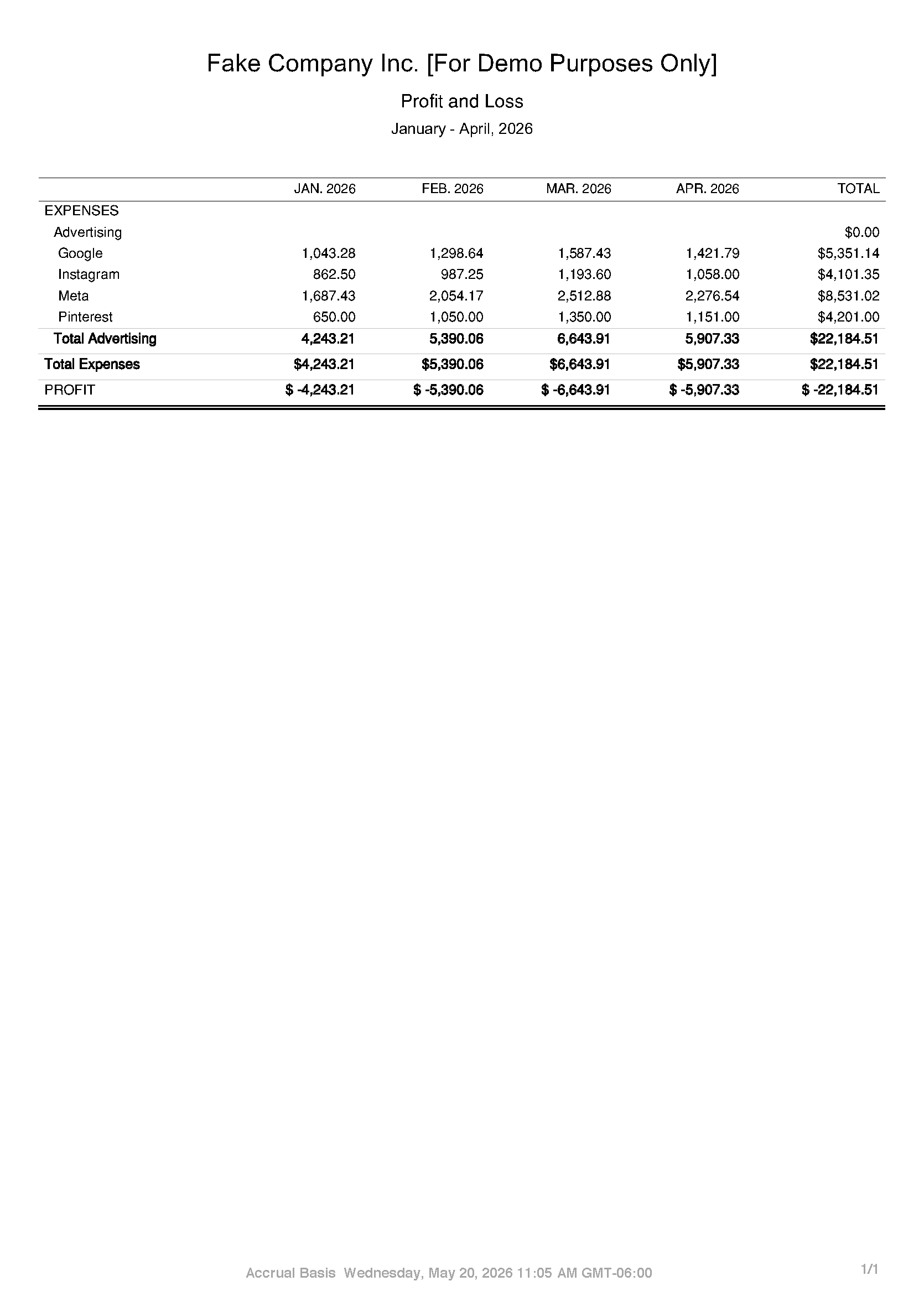
Suddenly you can see that you spent $22,000 on ads in four months. You can see that Meta was your biggest spend. You can see it crept up month over month. You have a starting point.
That's step one. Know where the money is going.
Building a system to track what comes back
Once your ad spend is categorized properly and you're pulling a monthly advertising report, you can start layering in your revenue data. Which months did spend spike? Did revenue follow? Which platform did you scale back, and did revenue hold steady? That's the conversation we have with advisory clients, and it's only possible because the books are set up to support it.
Ad companies have a financial interest in you not knowing how to measure this. The harder it is to attribute results, the easier it is to justify the invoice. Proper bookkeeping doesn't solve your ad strategy, but it removes the excuse for not having one.
What this looks like in practice
The screenshot above is a custom QBO report filtered to advertising only. Four platforms, four months, one clear picture. That took about three minutes to generate once the books were set up correctly. It's now a report that runs every month and takes thirty seconds to review.
If your current P&L has one line called "Advertising" and a number that makes you vaguely uncomfortable, that's where we start. Not with your ad strategy. Not with a new platform. With your books, because you cannot fix what you cannot see. Get the story first. Then figure out if the money is working. Turns out your bookkeeper and your marketing budget have more to talk about than you'd think.
